



The OPS Kick Builder Plugin

The OPS Kick Builder Plugin

Regular price€49,99
/
Tax included.

Early Access Discount
  • Free Access To All Future Updates & Upgrades
  • Works In All Major DAWs (Mac & Windows)
  • 5500+ Handmade Kick Part Database
  • 3-Day Money-Back Guarantee
  • Instant Install & Access Anytime

VERSION

Get access to the best Kick Builder Plugin for Harder-Style Production: Generate any kick type

The most overpowered plugin for Harder-Style Kick Production is here. Includes the full OPS Kick Part Library with over 5.300+ Kick Parts across EVERY Kick Type. 

Your guaranteed go-to tool to create Industry-Standard Kicks that instantly fit, fuel your inspiration, and level up your Kick Sound-Design like never before. All shipped with unlimited control over every part of your kick.

  • 5.300+ Factory Kick Parts Included - All Handmade (No Generative AI)
  • 19 Kick Styles Included (+ Create Your Own Kick Styles)
  • Included: Drag & Drop Samples (+ Add Your Own Libraries)
  • Included: FX Processing w/ 12 FX Modules
  • Included: Phase Alignment + Align Samples Automatically
  • Included: Key Detection, Key Tracking, Drag Stems, Autogain
  • Included: Visualiser Modes (Spectrum, Waveform, Mid/Side, Frequency Range)
  • Included: Save Presets (Kick Presets + FX Chains)
  • Genres: Hardstyle, Rawstyle, Industrial, Reverse Bass, Midintro, Anticlimax, Climax, Oldschool, Modern, Reverse Bass, Color, Pingpong, Psy, Jumpstyle, Zaag, Metal Kicks, Techno, Uptempo, Happy Hardcore, Gabber & so much more
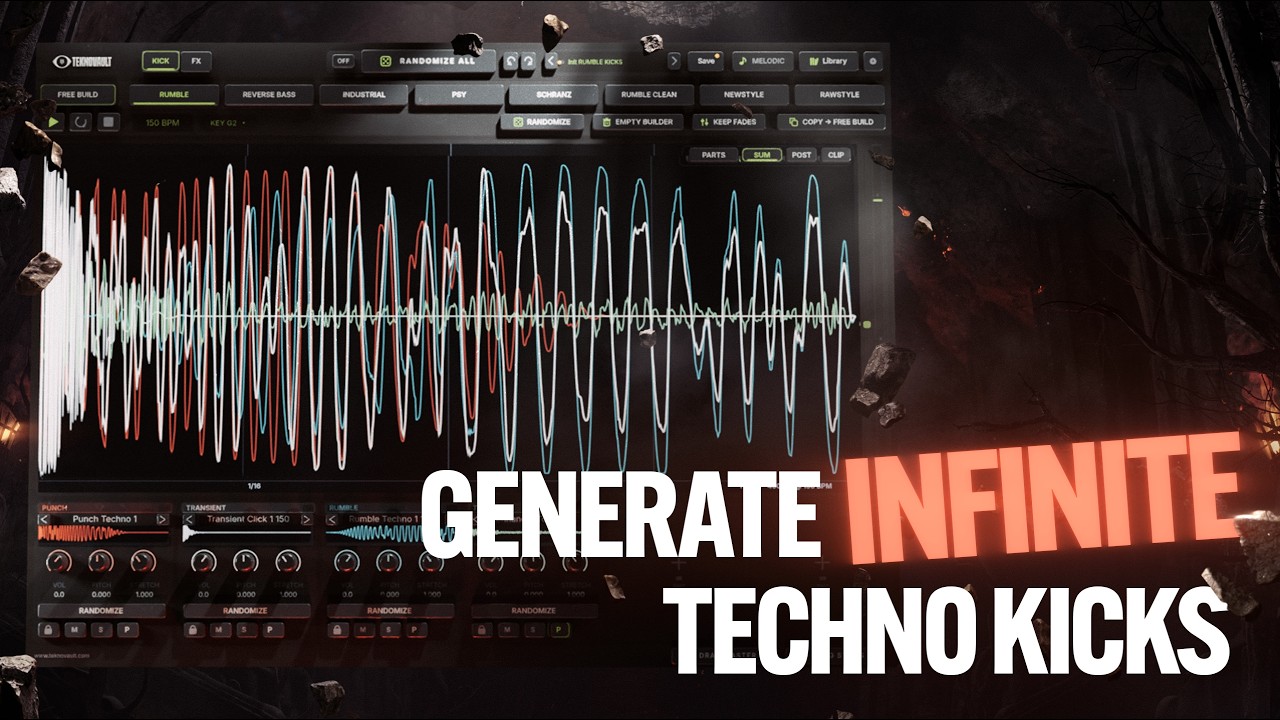
The best plugin ever made specifically for
hardstyle kick creation

Take a deeper look at the plugin in action

  • 01Database for every modern genre
  • 02Infinite customization, full FX rack
  • 035500+ file kick part database
  • 04Make industry standard kicks easy
  • 05Drag in your own samples & library
5500+ kick parts Endless randomization
Every genre Jumpstyle to Gabber
Full FX tab 12 FX modules + FX chains
Drag & drop Use your own samples
Specs
  • MacAU, VST3 and standalonemacOS 11+, Intel & Apple Silicon
  • WindowsVST3 and standaloneWindows 10+, 64‑bit
  • StandaloneNo DAW needed
  • Free updatesEvery future version
Works in
  • FL Studio
  • Ableton Live
  • Logic Pro
  • Cubase
  • Bitwig Studio
  • Studio Pro / Studio One
  • Reaper
  • Reason 12+
  • Nuendo
  • GarageBand

Not supported: Pro Tools (needs AAX).

Insane kicks in seconds

Kick Builder stacking kick parts No generative AI

This plugin is going to change the game for any Hardstyle & Hard Dance producer out there. Stacked with everything you need for unlimited creativity in kick production, while generating industry-standard kicks each time.

  1. 1Intelligent randomization rules
  2. 2Pulls from 5500+ handcrafted parts
  3. 3Post processing in FX tab & FX chains
  4. 4Unlimited control over your kick
Generate in any style

Preview some of the kicks built with this plugin

Click a genre multiple times for new kicks
01Newstyle
02Industrial
03Reverse Bass
04Psy Techno
05Zaag
06Rawstyle
07Rumble
08Rumble Clean
09Schranz
10More styles coming

Factory FX chains for every genre

Stepping through factory FX chains in Kick Builder

Not sure where to start with processing? Load a complete FX chain in one click. Every genre comes with its own factory chains, built to get your kick to an industry-standard level instantly.

ACycle through FX chains with the arrows
BLock FX Chain keeps your rack through every randomization

Start from a factory chain, then make it yours, or build one completely from scratch. Every chain is fully editable: swap modules, tweak the presets and save it as your own.

Control every FX module

Add as many FX modules as you want, rearrange the order, and process your kick to an industry-standard level. Choose from 12 FX modules:

Distortion module Equalizer module Mid/Side EQ module Stereo module Kick Shaper module Transient Shaper module Finalizer module Multiband module Filters module Combs module Allpass module Convolver module

Comes with multiple distortion modes: Soft Clip, Hard Clip, Waveshaper & Asymmetric Waveshaper (draw your own shapes), Wavefolding, Rectify & more. Increase the drive and instantly see how the distortion shapes your kick waveform in real time.

Equalize your kick with bell curves, low & high shelves, low cuts, high cuts and notches. Change the Q, gain & frequency, or type in a specific key frequency anywhere between C0 and B9.

A split EQ for the mid and side, so you can easily process them separately. Commonly used to remove sub & bass frequencies from the side information.

Control the width of your kick. Set the width, keep everything below a set frequency in mono with Low Mono, and add a Haas delay to the frequency range you mark on the display.

Draw the volume curve of your kick or start from one of the preset shapes, then set the amount. Save your own shapes and compare pre and post on the display. Great for shaping transients or adding an offbeat drive.

Add attack or duck your transient, and set the speed to choose which part of the transient is affected.

The final stage that instantly makes your kick 80% better: a bass boost low shelf, bass mono below a set frequency, and a clipper that shows you in real time which part of your kick waveform got clipped.

An upward and downward multiband compressor with depth and time knobs, crossover frequencies between the high, mid and bass bands, gain control for each band and a linear phase mode.

Shape your kick with phaser, comb, notch, lowpass, highpass and band filters, with cutoff, resonance and drive, dB slope modes and polarity switches.

Add comb filter resonance to your kick. Set the frequency, feedback, damping and spread, and see the resonance on the display.

Smear the phase of your kick around a set frequency. Set the amount, pinch and spread, and see the phase smear on the display.

Pick an impulse and add convolution on top of your kick, with an envelope synced to the beat for maximum control. Great for kick reverb or interesting room effects.

01 / 12 Distortion
FX chain controls
  • Add as many FX modules as needed
  • Easily rearrange the position of an FX module
  • Save your FX chain presets
  • Duplicate, save as default & more
  • Lock FX chain, bypass & empty chain

Endless control over every part

We went absolutely next-level with features that will help you build your kicks with extreme control. They let you go really in-depth and approach kick building from an advanced level.

Navigate the plugin
Click a dot or a feature to zoom inTap a dot or a feature to zoom in
Kick pageThe style sidebar, the visualiser, the transport and the sample slots.

Generate

Transport

View

Shape

Align

Stack

Export

Rack

Modules

Presets

Sounds

FX chains

My Sounds

General

More

OPS Kick Builder, Kick page Kick page with the VIEW menu open Kick page with the Clip preview on Kick page with a selected part and its fade Kick page with the ALIGN and PHASE panel open Kick page with 12 sample slots FX page with a full FX chain FX page with the Equalizer FX page with the Multiband Library, Presets tab Library, Sounds tab Library, FX Chains tab Library, My Sounds tab Settings

Add your own sample libraries

Dragging your own samples and library into the plugin

Don't like the 5500+ kick parts included? Rather use your own kicks? We got you! We made sure you can seamlessly integrate your own samples into this plugin:

ADrag & drop samples into sample slots
BAdd your own sample library (auto reads structure)
CYour sample library will show up in the sample slots

This way you truly make the plugin your own. Save your personal processing FX chains, randomize within your own library, and generate insane variations of your own kicks in seconds.

The kick part database

Every part in the plugin has been handcrafted from the ground up. Combined with intelligent randomization rules, every kick generation sounds professional.

2070

Punches

  • Rawstyle379
  • Industrial317
  • Gated205
  • Punchy Electro133
  • Zaag112
  • Uptempo111
  • Kloenk104
  • Futuristic101
  • +12 more styles608
1646

Crunches

  • Industrial441
  • Rawstyle213
  • Gated194
  • Zaag160
  • Uptempo113
  • Reverse Bass Old97
  • Futuristic79
  • Oldschool76
  • +6 more styles273
441

Enhancers

  • Reverb343
  • Bass Punch59
  • Noisy20
  • Reverse19
409

Rumbles

  • Clean230
  • Various54
  • Techno45
  • 1-240
  • Extreme20
  • Pingpong20
398

Gabber

  • Distorted202
  • Happy Hardcore Punchy84
  • Clean62
  • Heavy50
315

Transients

  • Various178
  • Clicks91
  • Percy46
311

Post-crunches

  • Industrial140
  • Futuristic50
  • Techno41
  • 1-240
  • Extreme20
  • Pingpong20
Total5,590 files100% handcrafted

All the features

Frequently asked questions

Plugin

Which plugin formats are included?

Windows: VST3 and a standalone app. Mac: AU, VST3 and a standalone app. It works in every major DAW, including FL Studio, Ableton Live, Logic Pro, Cubase and Bitwig. Pro Tools is not supported, because it needs AAX.

Which styles are included?

Midintro & Techy, Reverse Bass, Color, Futuristic, Climax, Oldschool, Kloenk, Industrial, Zaag, Rawstyle, Jumpstyle, Psy and Pingpong, plus Free Build to mix across all of them. More styles are coming. You can also import your own samples and libraries.

Can I use my own samples?

Yes. Drag & drop wav, aif, flac, ogg or mp3 onto any slot, or add your own sample libraries. The plugin links to your folders, so they take no extra disk space, and shows their subfolders up to four levels deep, so you can browse and randomize inside your own sounds, in every style.

Can I use the kicks in commercial releases?

Yes. Every kick you make is 100% royalty-free, so you can use them in commercial releases.

Install & license

What are the system requirements?

Mac: macOS 11 Big Sur and up, on Intel and Apple Silicon (AU, VST3 and standalone). Windows: Windows 10 and up, 64-bit (VST3 and standalone). It runs inside all major DAWs or as a standalone app.

How do I install it?

After ordering you get instant access to the installer. Run it, open the plugin in your DAW (or the standalone app) and activate it with your license key.

Where do I find my license key?

Your license key is generated when you purchase and sent to you after ordering.

How do I activate the plugin?

Open the plugin, click ACTIVATE and paste your license key. This needs an internet connection once. One activation covers every DAW and the standalone app on that computer.

Can I move it to a new computer?

Yes. On the old computer open Settings, click License and deactivate it. Then activate on the new one with the same key.

Can I download it again later?

Yes, you can re-download the plugin anytime.

Updates & support

Do I get future updates?

Yes, for free. Whenever an update is ready, we send you the new installer.

How do I update to the latest version?

Run the new installer we send you. It keeps your presets, FX chains and sample libraries. Restart your DAW afterwards so it loads the new version.

What if it's not for me?

You're covered by our 3-day money-back guarantee. Get in touch through our contact page and we'll sort it out.

I need help, who do I contact?

Email us at shop@onpointsamples.com or reach us through our contact page.

Reviews

What people think about this plugin

Real reviews from producers who use it. Already building kicks with it? Leave yours below.